This past January, I presented a clinic session at the Illinois Music Educators Association All-State Conference in Peoria, Illinois. The topic was using YouTube in the Music Classroom. Though geared toward K-12 music educators, the content can be applied to any classroom. Everything from the presentation is covered in the Web site I created to accompany my presentation.
Web site: http://youtubeintheclassroom.weebly.com/
Handout: http://ferdonmusic.com/imea2011_youtubehandout.pdf
My YouTube Channel: http://www.youtube.com/user/Kipmusic2345?feature=mhee (check out the playlist titled "YouTube in the Classroom" - lots of helpful videos )

Wednesday, November 9, 2011

Saturday, December 11, 2010
Promethean Training Web site
Yes, I know I keep saying I will blog more but then school started and my new semester at Boise. Enough said.
Fall semester I took EDTECH 554 - Managing Technology Integration in Schools. The class is winding down and I thought I'd post a link to one of my projects. The final project for the class was to plan a professional development opportunity and the topic I chose was Promethean Training. My district has invested in Promethean Boards and Learning Response System devices and even the most experienced of us has only had Promethean technology available in our classrooms for a bit over a year. I participated in some training sessions in fall, 2009 then got a board in spring, 2010. Meeting a variety of training needs seems to be a commonplace issue, so I developed a series of training modules that would be appropriate for individuals with quite varying degrees of prior experience and training. Should you use any of the training modules, I would be very interested in hearing your thoughts about them. As always, I hope they prove to be useful to someone, someday, somewhere!
Here is the link: http://pbtraining.weebly.com/
Saturday, August 7, 2010
New Web site!
My Boise classes are over, for a few weeks at least, and I've started working on two new Web sites. I used Weebly for the first time this summer, for a thematic unit project for my technology integration class, and decided to use it for two Taekwondo Web sites I'm creating - one for my children's Taekwondo Master, and the other for my son's coach.
Weebly is a very intuitive tool and using the two column element allows you to get a bit fancy with layout. For the most part, I stuck with the standard elements, but I did change CSS to add my own banner and match the colors of the blue stripe and title text to the banner. If you know CSS, it's easy to modify and if you don't, you've got plenty of options. I used the free version of Weebly for my thematic unit and Master Chang is using the pay version. With the pay version you have your own domain name - a definite plus for a business Web site and at $34/year it is very reasonably priced. If you're an experienced Dreamweaver user, Weebly probably will be too limiting for you, but for everyone else, Weeby is a great option to look at if you're considering putting together a Web site.
The first of the two sites is 95% finished, we're just waiting for some bios and pictures of instructors. Here is the link: www.changstkd.com. The other site will be for the Morton Grove location and will have a similar site structure and some common text.
Friday, August 6, 2010
Getting Stereo Sound in GarageBand
I had a question come in from my YouTube channel and thought I'd put the answer here. When recording vocals, sound was coming out of the left speaker only but he wanted stereo. Here are my suggestions for troubleshooting:
 First, check your microphone. If it's not a stereo mic, it can't record in stereo (use both L and R speakers). If you're not sure if it's a stereo mic, click on the Real Instruments tab then look at the bottom where it says "input source." If it is a stereo mic, you will see something like "Stereo 1/2 ..."
 If you have a stereo mic, but you're not getting stereo sound, then the problem is likely (hopefully!) your track pan. The track pan determines how much of the sound goes to the left and how much to the right. When the track pan is pointing to the 12-o'clock position, you will get equal amounts of sound to both sides.
 Track pan all the way left sends sound to the left speaker only. Place your mouse cursor over the little button and rotate the dial to the desired location.
If track pan is at center/up and you're still getting sound only from the left speaker, check the speakers (make sure it's this song, not the equipment). If the speakers are fine (you played a different song in GarageBand and got sound from both sides) and the track pan is all the way up, we resort to drastic measures. Try copying and pasting the audio into a new track. For this track, set the pan all the way to the right. This would be a cheating way of getting stereo, but just might give you the sound you're looking for.
I hope this helps!
 First, check your microphone. If it's not a stereo mic, it can't record in stereo (use both L and R speakers). If you're not sure if it's a stereo mic, click on the Real Instruments tab then look at the bottom where it says "input source." If it is a stereo mic, you will see something like "Stereo 1/2 ..."
 If you have a stereo mic, but you're not getting stereo sound, then the problem is likely (hopefully!) your track pan. The track pan determines how much of the sound goes to the left and how much to the right. When the track pan is pointing to the 12-o'clock position, you will get equal amounts of sound to both sides.

If track pan is at center/up and you're still getting sound only from the left speaker, check the speakers (make sure it's this song, not the equipment). If the speakers are fine (you played a different song in GarageBand and got sound from both sides) and the track pan is all the way up, we resort to drastic measures. Try copying and pasting the audio into a new track. For this track, set the pan all the way to the right. This would be a cheating way of getting stereo, but just might give you the sound you're looking for.
I hope this helps!
Wednesday, July 28, 2010
Tech Integration Tips
Yes, I know I keep saying that I'm going to blog more regularly, then I get caught up in my Boise Classes. Just for fun, here is a link to graphics I created this summer for EDTECH 506 - Instructional Message Design. Feel free to use anything you want. Like the other content I have created for my EdTech classes, these will live on the Boise State server until after I finish my degree program. I only have four more classes to go, but none are offered in the summer, so that means two more years. At some point between now and then I will move them to my non-Boise Web site. And now, on to the real topic for this post.
A friend is interviewing for an elementary music teaching position and I put together a few tips, should the topic of technology integration come up in the interview. Here they are ...
Share what you’ve done and what you want to do:
Take advantage of free online tools. Consider:
Benefits of technology use in the classroom:
Professional Development Opportunities:
A friend is interviewing for an elementary music teaching position and I put together a few tips, should the topic of technology integration come up in the interview. Here they are ...
Share what you’ve done and what you want to do:
- What technology are you comfortable with for personal and professional use?
- Check out NETS for Teachers to see where you fit on the continuum.
- What technology (equipment, software, online) was available in your previous position? How did you use it?
- What technologies are you familiar with that were NOT available in your previous position? Discussion with other music teachers, workshop topics, etc. may have given you a peek into other possibilities.
Take advantage of free online tools. Consider:
- Curriculum - Determine what curricular goals and objectives need support then choose the most effective tool. Considering tech tools first (choosing a new fun thing then trying to find an educational application for it) is putting the cart before the horse.
- Terms of Use – Some sites are only for those 13 and older.
- Platform - Online, free download, Mac/Windows.
- Privacy - No personal information! Some online tools need e-mail accounts for each user/student.
- Tracking - Some allow teachers to set up “classes” and track student progress.
- Logistics - One computer w/projector vs. mobile lab vs. computer lab/separate location. Balance benefits of tech with impact on class time, but remember that there will be fewer bumps farther down the road.
- Integrating technology in the music classroom is about much more than just music tools. Many tech tools that are part of the “regular” classroom (blogs, wikis, for example) apply to any subject area.
Benefits of technology use in the classroom:
- More possibilities for differentiation of instruction.
- Illinois Learning Standards - Goal 26A: Understand the processes, traditional tools and modern technologies used in the arts.
- Multiple Intelligences – Flexible means of interacting with content and expressing understanding.
- Authentic Learning – Use of tools that are commonly used by practicing musicians/composers. For example, computer-based composition instead of pencil and paper.
- Global Connections (Illinois Goal 27):
- National Geographic World Music
- Putumayo Kids
- World Music Network
- YouTube (safety features: create own channel, use safe mode, embed player)
- SafeShare.tv (for YouTube videos only, allows editing of in/out points, masks all
content except the video itself).
Professional Development Opportunities:
- Many districts offer training for specific equipment (interactive whiteboard, for example) and tools (district-hosted Web sites and blogs).
- Find people/groups to follow – See what others are doing and think about applications to your own classroom. When you find someone you like, see who they are following.
- Blog/Website/Wiki: Carol Broos (lives in Gurnee, teaches in Northfield - Golden Apple Recipient, frequent presenter at tech and music conferences, lots of links to follow)
- Blog: High Techpectations (Lucy Grey)
- Blog: Educating Educators (general tech for teachers)
- Organization: Technology Institute for Music Educators (TI:ME, resources, conference, newsletters, classes)
- Online tutorials for specific software/tools (example: GarageBand)
- Workshops, conferences and classes (TI:ME offers specific, sequential training)
- Technology Integration in the Elementary Music Classroom
- 2008
- TI:ME / Hal Leonard publication
- Detailed lesson plans
- If I could only buy one book, it would be this one - Technology Guide for Music Educators
- 2006
- TI:ME / Thomson Course Technology
- Very helpful if you are working with hardware – covers types of equipment and set-up
- Does not include newer technologies (iPod, open source/free tools). - YouTube in Music Education
- 2009
- Thomas Rudolph and James Frankel / Hal Leonard
- The majority of the book deals with consuming YouTube content (creating an account and channel, etc.) but there is also useful information about creating and posting videos (including a great section on copyright). - Music Technology Workbook: Key Concepts and Practical Projects
- 2008
- Paul Middleton and Steven Gurevitz / Focal Press
- A great deal more technical than the books listed above.
- Mostly MIDI with some info on recording and mixing. Most appropriate for advanced middle school or high school MIDI Music Labs. I would suggest reading this only for those working in an advanced composition lab situation.
Monday, November 2, 2009
GarageBand - Editing software instrument tracks
I know it's a shock, here I am posting two days in a row! Now that my tutorials are on YouTube, people are watching them and sending back questions. As questions come through my YouTube email, I will post them here as well.
Question:
When I record a software instrument, how can I edit where it begins and where it ends? Example: I click add new track, I click software instrument, I use the grand piano and record something. I double click it and the track editor comes up, and want to delete the time it took for me to press the button to stop recording. How do I do that?
Answer:
When editing green tracks, you can to split the track then delete the section you don't want to keep. Here is what I would do:
1) Make sure the track isn't locked. Locking frees up your processor, uses less power, and saves your track from unintentional changes. Locking is good if you have finished editing that part and you want to save power, but locking is bad if you want to make changes. If the track is locked, the lock icon will look like this:
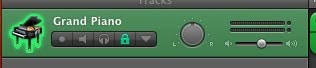
2) To unlock, click the padlock. When it goes to gray, you can edit the track.
3) Place the playhead/cursor at the spot where you want to cut.
4) From the menu, choose edit>split.
5) Click outside the track (so it's not all bright green anymore) to deselect the recording.
6) Click on the section of the track (now separate from the rest) that you want to delete. It will turn bright green.
7) Press the delete key or choose edit>delete from the menu.
Hopefully, that will work for you! Keep those questions coming :-)
Question:
When I record a software instrument, how can I edit where it begins and where it ends? Example: I click add new track, I click software instrument, I use the grand piano and record something. I double click it and the track editor comes up, and want to delete the time it took for me to press the button to stop recording. How do I do that?
Answer:
When editing green tracks, you can to split the track then delete the section you don't want to keep. Here is what I would do:
1) Make sure the track isn't locked. Locking frees up your processor, uses less power, and saves your track from unintentional changes. Locking is good if you have finished editing that part and you want to save power, but locking is bad if you want to make changes. If the track is locked, the lock icon will look like this:

2) To unlock, click the padlock. When it goes to gray, you can edit the track.
3) Place the playhead/cursor at the spot where you want to cut.
4) From the menu, choose edit>split.
5) Click outside the track (so it's not all bright green anymore) to deselect the recording.
6) Click on the section of the track (now separate from the rest) that you want to delete. It will turn bright green.
7) Press the delete key or choose edit>delete from the menu.
Hopefully, that will work for you! Keep those questions coming :-)
Sunday, November 1, 2009
GarageBand Tutorials Have a New Home!
Yes, I know ... I keep saying I will post more often, but life keeps getting in the way of that. After my summer classes at Boise, I left the next day for a family vacation in Oregon. I came back and had two weeks to pack my oldest off to college, shop for school supplies and clothes for the other two kids, unpack my classroom, and get ready to teach new curriculum to six grade levels (485 students now). The first day of school was my first day for my fall semester Boise class. Needless to say, I have gone through my entire quota of Jolt mints (caffeine is my friend) with several weeks left to go in the semester.
I digress. One of my assignments for Boise this week was to do a video response to a discussion question classmates put on YouTube. I created a YouTube account in 2008 but didn't do anything with it and now I was inspired. I've been holding off moving my GarageBand tutorials off the Boise server because I didn't want to go over my limit on my Yahoo website account. Problem solved - I uploaded my lovely GarageBand Tutorials to my YouTube channel. People have somehow found my Guitar Roadtrip and GarageBand Tutorials (they send me nice emails) and I am hoping that more people will find the GarageBand Tutorials now that they are on YouTube. I had to do some editing on my web pages when I moved them over to my ferdonmusic.com site but it was fun. Of course, I really should have been doing lessons plans, but I couldn't resist!
Here is a link to the new home for my GarageBand instructional materials: http://www.ferdonmusic.com/garageband/intro.html, and my YouTube Channel: http://www.youtube.com/Kipmusic2345. If you hurry you can see me in my chicken hat on YouTube. But you can bet your buttons that my Accessibility video will be yanked off YouTube the second this class is over! Better hurry ...
Subscribe to:
Posts (Atom)